
May 29, 2026
How to enrich your entire Attio pipeline in bulk
Stop enriching contacts one by one. Here is how to find emails and phone numbers for dozens or hundreds of Attio records in a single click.
Enriching contacts one at a time is fine when you are working a handful of records. But when you import a new list, sync a fresh batch of leads, or inherit a pipeline full of missing emails and phone numbers, doing it record by record quickly becomes a chore.
That is exactly what bulk enrichment is for. With Aanrich, you can select as many Person records as you like and enrich them all at once, without ever leaving Attio.
What bulk enrichment does
Bulk enrichment runs the same waterfall lookup as a single enrichment, just across many contacts at once. For each selected record, Aanrich queries 15+ data providers in sequence, picks the best result, and writes it straight back into the Person record in Attio.
Each contact is processed individually in the background, so a large batch keeps running even after you move on to something else. Results appear on each record as they come in.
Step 1: Select your records
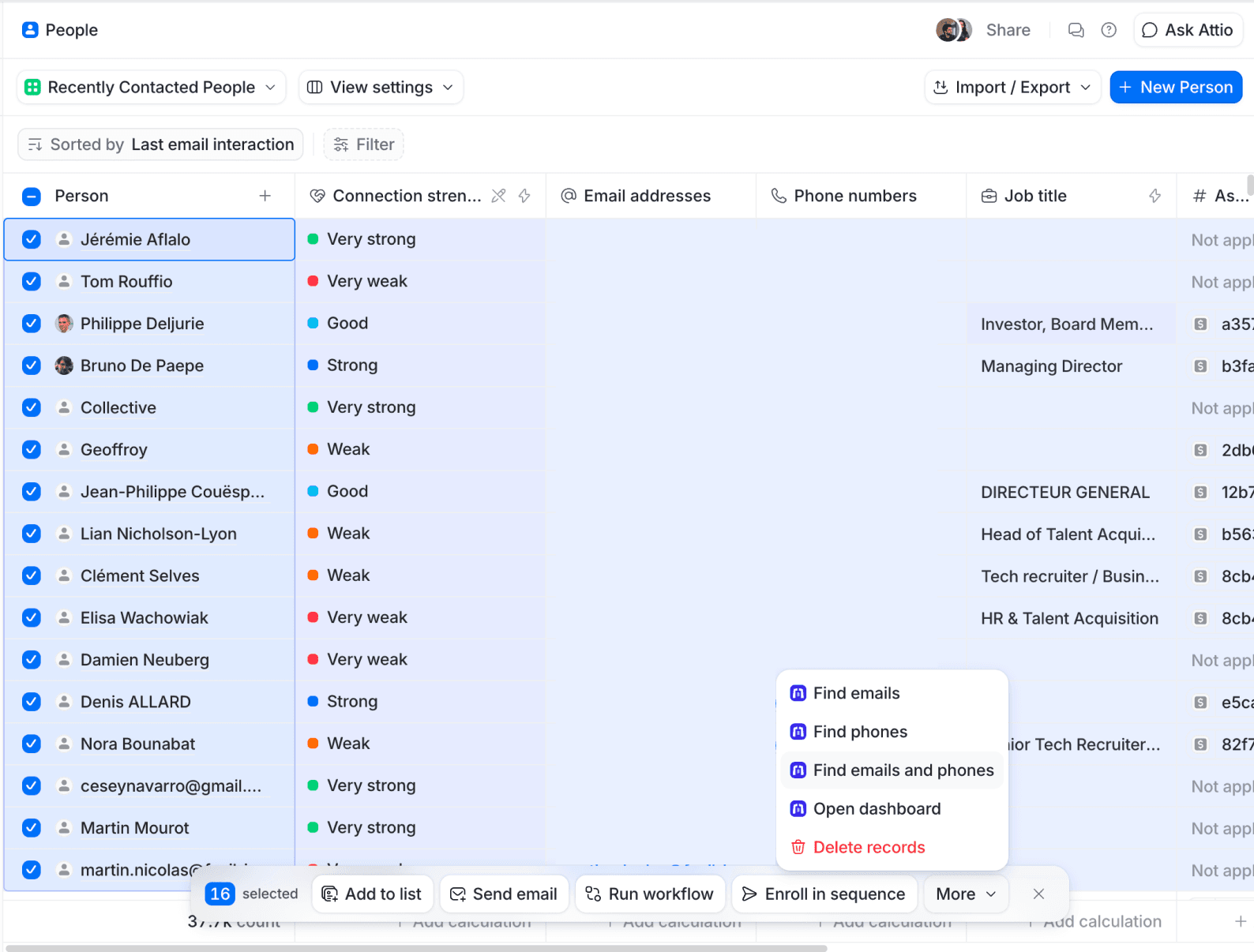
Open any People view in Attio and select the records you want to enrich. You can tick them individually, or use a filtered view to target exactly the contacts that are missing data.
A good habit: filter your view to show only people without an email or phone number first, then select all. That way you never spend a lookup on a contact who is already complete.
Step 2: Choose a bulk action
With your records selected, click More in the bar at the bottom of the screen and pick one of the three Aanrich bulk actions:
- Find emails - Look up a professional email for every selected contact (1 credit each)
- Find phones - Look up a phone number for every selected contact (10 credits each)
- Find emails and phones - Look up both at once (11 credits each)
Step 3: Let it run
Once you confirm, Aanrich starts working through your list in the background. There is nothing else to do. Each result is written directly to its Person record as soon as it is found, so your data fills in progressively.
You can keep using Attio normally while the batch runs, or close the tab entirely. The enrichment continues on our side either way.
How credits work in bulk
Bulk enrichment uses the same credit rules as single lookups, applied per contact:
- 1 email lookup = 1 credit
- 1 phone lookup = 10 credits
- 1 email + phone lookup = 11 credits
The most important part: you only pay for successful lookups. If we cannot find data for a given contact, that credit is refunded automatically. So running a bulk action across 200 records never costs you more than the data you actually receive.
You can track exactly what was found, what was refunded, and what was already in your CRM from the dashboard, available through the "Open dashboard" action on any record.
Tips for the best results
- Filter before you select. Target only the contacts missing the data you need so you never spend a lookup unnecessarily.
- Start with email. If you are watching your budget, run an email-only bulk pass first. It is the cheapest lookup and covers the most common gap.
- Make sure names and companies are filled in. The more context a record has, the higher the match rate across providers.
- Keep an eye on your balance. A large phone batch adds up fast at 10 credits each, so top up before a big run.
Ready to enrich at scale?
Install Aanrich and get 11 free credits to try bulk enrichment on your own pipeline.
Install on Attio